Running Local AI: How to Use Transformers.js in a Chrome Extension
Running local AI inside a browser extension under Manifest V3 isn't just possible—it is the architecture we should have been building all along....
Everyone wants to ship AI features right now, but most developers immediately reach for a bloated cloud API. Why? Habit, mostly. We route every keystroke through a remote server, paying fractions of a cent per token, accepting latency, and handing over user data to third parties. It is lazy engineering. Local inference changes the math entirely. When you figure out how to use Transformers.js in a Chrome extension, you realize you can run capable open-weights models completely client-side without melting the user's laptop.
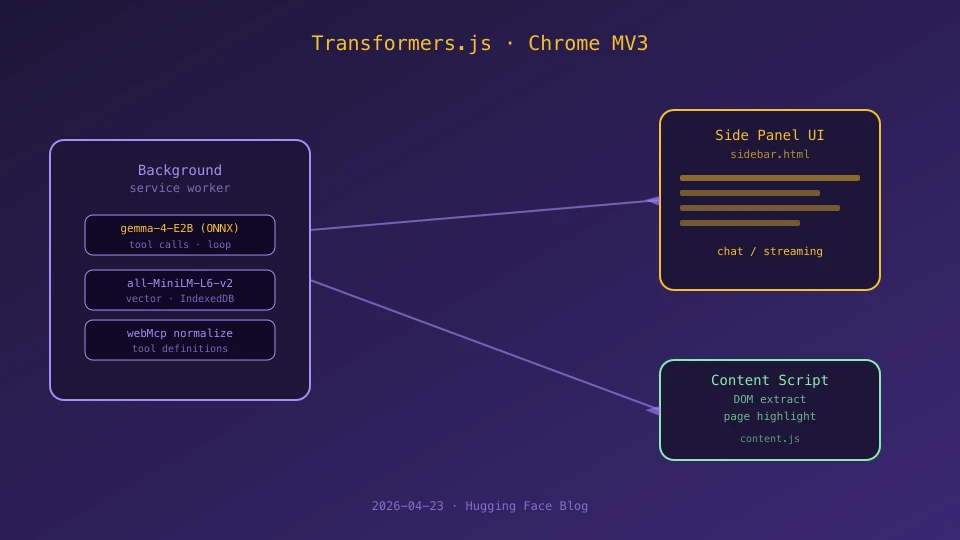
Of course, Google's Manifest V3 framework puts up plenty of roadblocks. It you cannot just drop a massive transformer model into a standard script and hope for the best. Chrome extension runtimes are heavily compartmentalized, forcing you to think carefully about background service workers, isolated side panels, and content scripts that talk to active web pages. If you orchestrate this mess poorly, your service worker will constantly drop states, memory consumption will spike. Also, the browser will ruthlessly end your heavy tasks.
The secret lies in rigorous separation of concerns. You treat the background service worker as your heavy-duty control plane – handling the model lifecycle, token generation, and complex tool execution – while keeping the side panel strictly lightweight for UI rendering and streaming chats. Content scripts act only as subtle bridges to safely extract DOM content when explicitly requested. By centralizing conversation history and inference logic in the background layer, you completely avoid duplicate model initialization nightmares.
Building this kind of local — and this matters — setup proves that client-side reasoning is finally doable for everyday tooling. It sure, wrestling with async message passing and Chrome's aggressive memory management takes patience. But the payoff is immense: a snappy, private assistant that works offline, respects user boundaries, and doesn't depend on someone else's fragile cloud base — at least for now. Stop renting intelligence and start shipping tools that actually run where the user is — more or less.