Why the Best Productivity App Is Actually Just a Text Document
We have buried simple to-do lists beneath mountains of cloud databases, AI integrations, and endless subscription tiers. It is time to go back to plain text....

I have spent entirely too much time testing productivity software over the years. It feels like a sickness at this point. Every month, some venture-backed startup drops a dazzling new task manager promising to revolutionize how I organize my life with machine learning, automated tagging, and cross-platform real-time syncing. Yet, beneath the slick marketing and glowing dark-mode interfaces, I always find the same exhausting trap: you spend more time managing the tool than you do actually working. We have somehow convinced ourselves that a simple list of chores requires a relational database, a complex hierarchy of tags, and notifications that trigger ambient dread.
The truth is embarrassing. Humans figured out lists thousands of years ago, and clay tablets worked just fine. Modern software engineers, however, love overcomplicating things. They take a fundamentally analog concept – writing down three things you need to finish before lunch – and wrap it in bloated frameworks that hostage your data inside proprietary cloud silos. If your internet drops or the company pivots, your entire workflow vanishes into thin air. That is just vendor lock-in disguised as efficiency; give me a local file over a cloud-dependent server rack any day of the week, especially when I am just trying to remember to buy milk and reply to an email.
This brings me to a refreshing little Mac utility called Tasks.txt, built by Yevhen Kharkivskyi, which strips away nearly all the modern software industry's toxic design philosophies to give you the digital equivalent of a clean sheet of paper. Built on Gina Trapani's enduring todo.txt standard, this application refuses to apologize for being simple. When you launch it, you get three straightforward buckets: Next, Backlog, and Done. There are no onboarding wizards, no team collaboration upsells, and definitely no artificial intelligence trying to rewrite your grocery list. You just open the window, start typing at the blinking cursor, and hit enter.
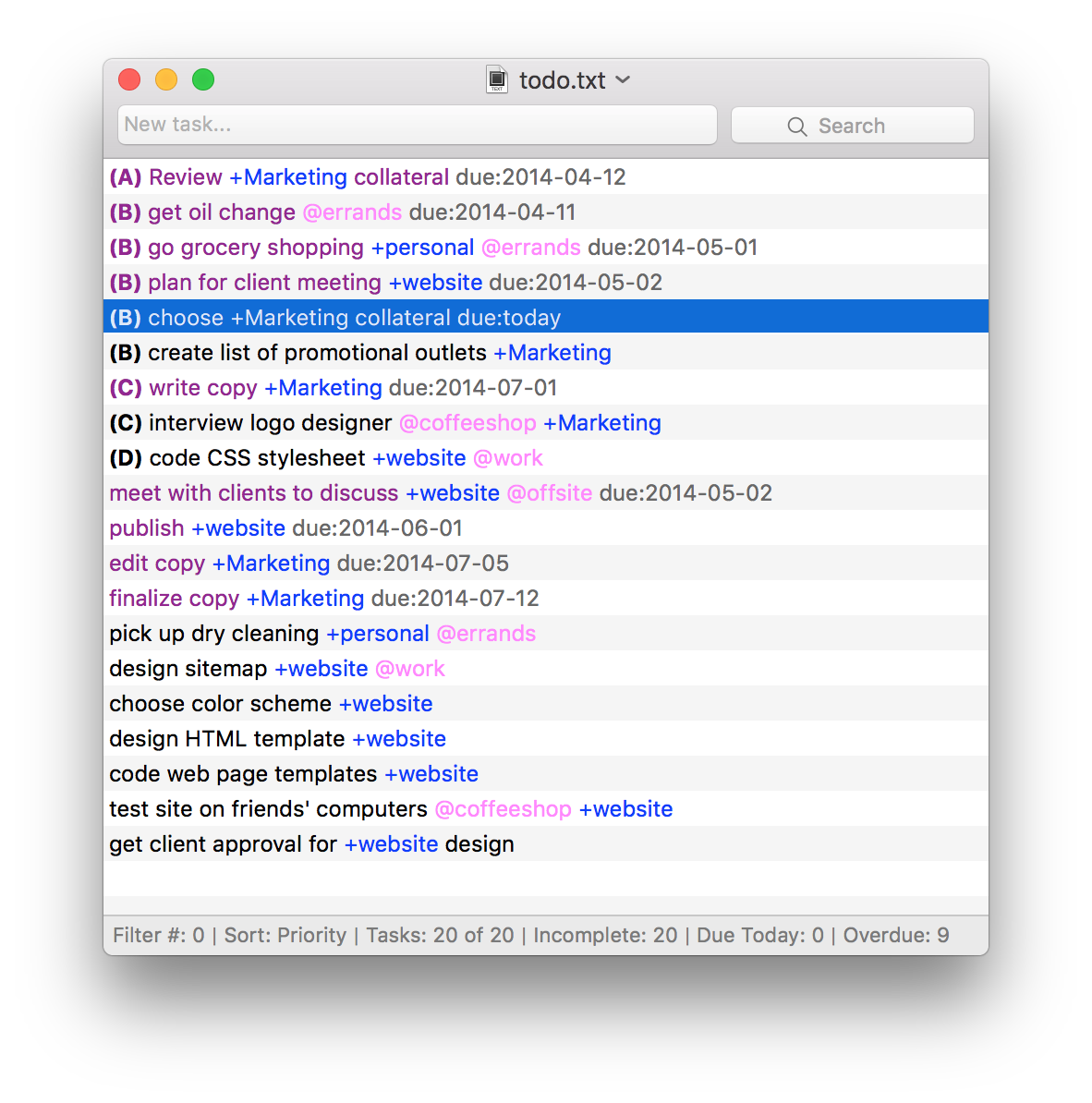
What makes a tool like this genuinely delightful to use is the absolute respect it shows for your keyboard and your attention span. You can fly through your morning planning session entirely without touching a mouse, navigating via crisp shortcuts that actually make sense, while knowing your precious data rests comfortably on your local hard drive as plain, human-readable text. You can open those files in any editor you want, immune to platform obsolescence. When we stop worshipping feature creep and start respecting raw utility, software gets fun again. Sometimes, you do not need a new system. You just need to write things down.
Stop feeding the hype machine.