Introducing the Command Palette and global search
A few thoughts on the introduction of the command palette, a better way to navigate and perform actions. The central hub for navigating xetarev with a simple keyboard shortcut
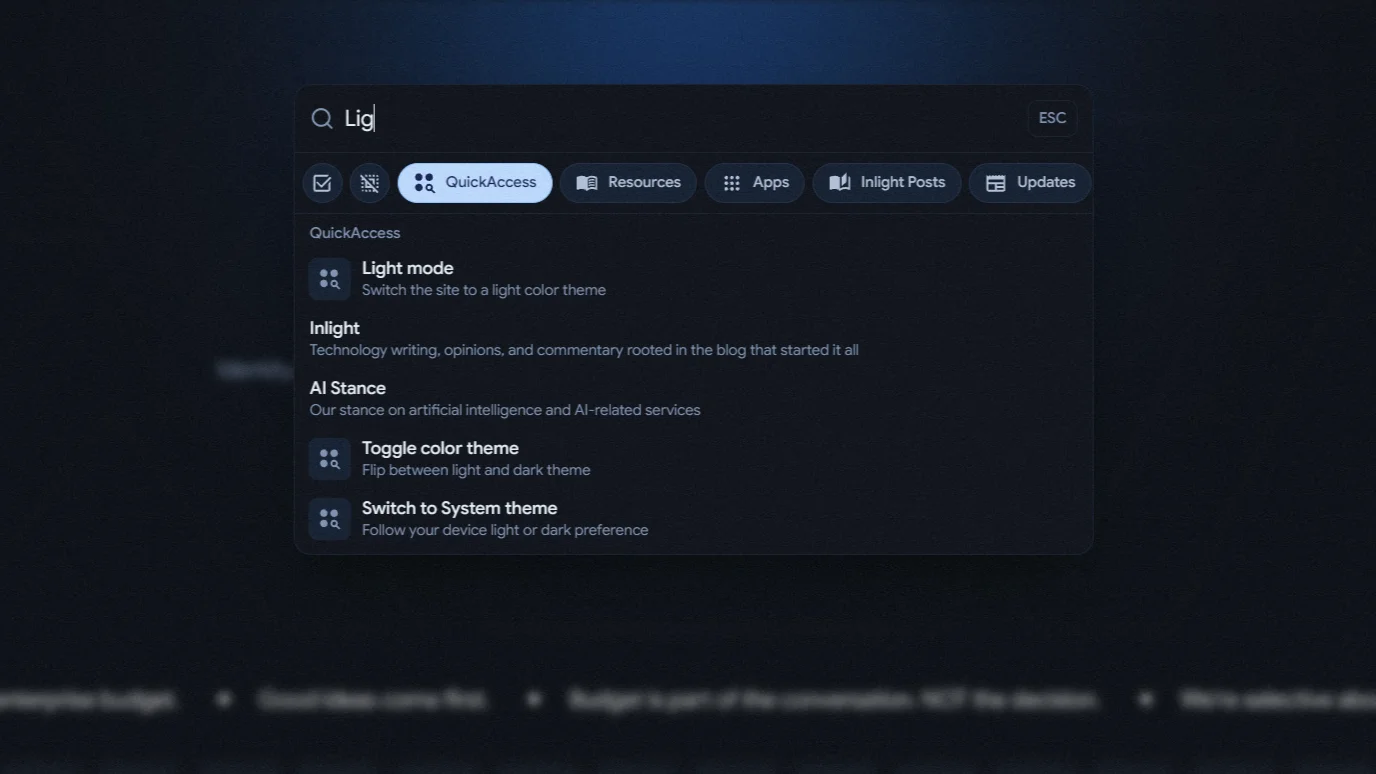
The new command palette is a unified search hub that lets users navigate Xetarev with a single keyboard shortcut. Instead of hunting through menus or clicking through multiple pages, you can now perform actions with QuickAccess shortcuts, search across Pages, look through Resources, browse the App Suite, search Inlight blog posts, updates, and all our services all in one place.
Smart filters narrow down by source, and results are intelligently ranked by relevance. Whether you're looking for a specific setting, trying to find documentation, or just want to switch between light and dark mode, everything is now just a few keystrokes away.
- QuickAccess - Our most common pages and actions
- Resources - All documentation and guides
- Apps - Our app suite
- Inlight Posts - Our blog content
- Updates - Product updates and news
- Services - Internal services and tools
Simply type your query, and see results from all enabled sources, narrow down by clicking the chips if needed or broaden search if you can't find it in the first go.
Some implementation
- Smart defaults: The palette intelligently decides which sources to show by default. If you're on the resources page, it automatically enables resources search. If you're elsewhere, it starts with QuickAccess with the ability to broaden your search from anywhere.
- Result scoring: The palette interleaves quick access pages and actions instead of grouping them obtusely. So if you type "theme", you'll see the theme settings options AND the dark mode action, ordered by how well they match your query.
- Remote search: For blog posts and updates, the palette is pulling from our content systems. Fitted with smart timing to avoid overwhelming our servers while feeling snappy and responsive.
- QuickAccess actions: The quick actions include theme switching, copying page URL, sharing the page, gracefully handling edge scenarios like preventing confusion when the theme can't be changed on certain pages.
There's definitely room to grow here. Like adding keyboard shortcuts for common actions, persistent search history for Xetarev users, possibly fuzzy (algorithmic, not related to teddy bears) matching improvements, better error handling for remote search as well.
Get Started
Ready to find anything on xetarev? Here's how to use the new command palette:
- Open it up: Just press
Ctrl+K(on Windows) orCmd+K(on Mac) from anywhere on the site. A search box will pop up in the center of your screen. - Start typing: Type what you're looking for - a page name, a setting, an app, or even just a word like "theme" or "help." As you type, you'll see results appear instantly.
- Filter your search: At the top of the palette, you'll see small filter buttons like "QuickAccess," "Resources," "Apps," and more. Click these to narrow down what you're searching. For example, if you only want to find apps, just click the "Apps" button.
- Try quick actions: Type common words like "dark mode," "share," or "copy link" to see handy actions you can take right from the search box.
That's it! No menus to click through, no pages to navigate. Just type and go.