
Made with ♥ by Avi

Google Assistant will now change compromised passwords


A year ago, Google promised that their assistant would offer to change compromised passwords, and now the company is doing just that. Google Assistant warnings are now rolling out to Chrome users in the masses, including Android users.
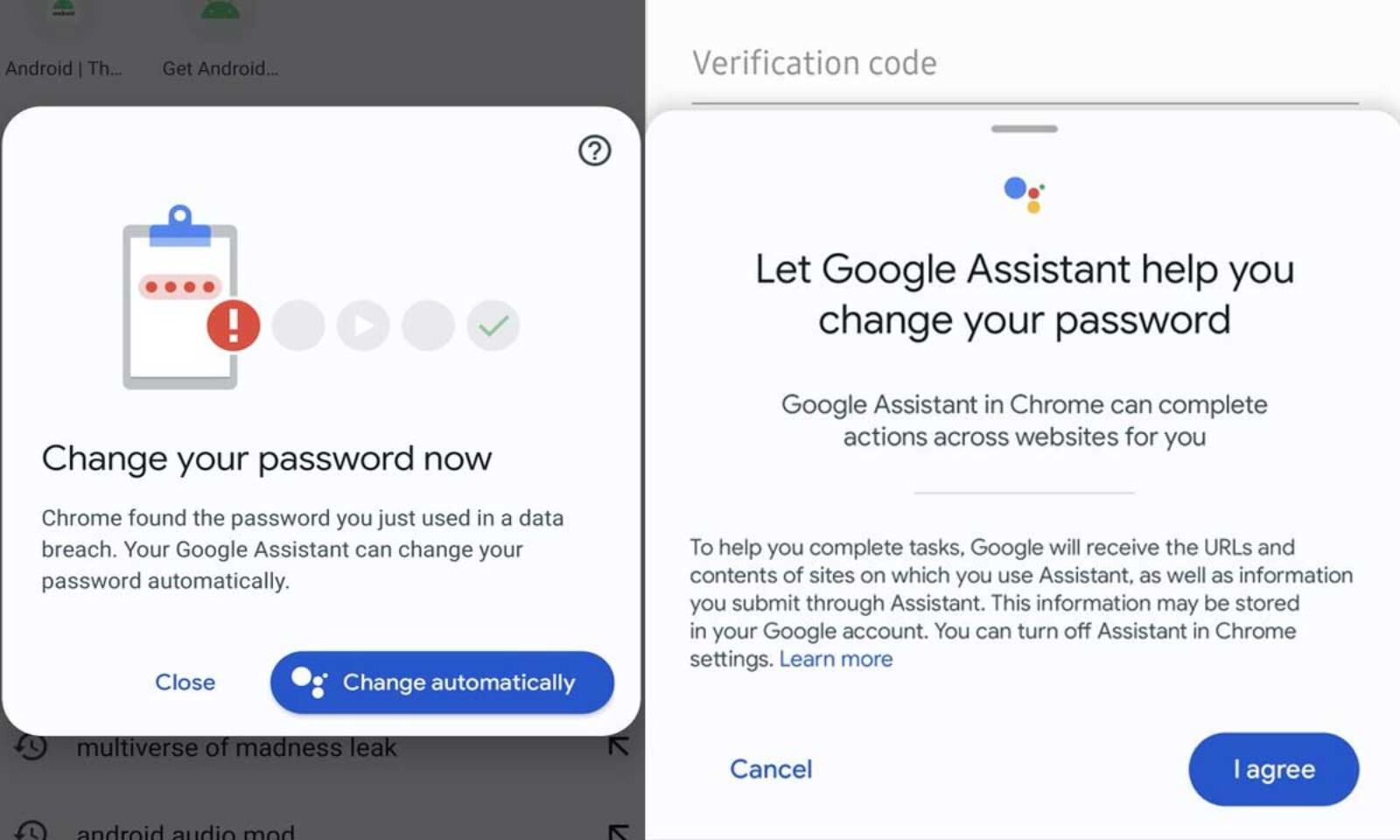
If you sign into a website with a compromised password, you will get a ‘Change your password’ alert and the option to have the Google Assistant automatically make that change for you. You can take control of the sign-in password process at any point too.

The Google Assistant helper for the password uses the AI from Google’s Web version of duplex navigating websites and applying password changes as it already knows how to click scroll and fill forms that require human verification. [Which begs the question, will reCaptcha be valid in the future?] Anyways, this feature doesn’t work on every website currently. However, this tool has been only available to a very small group of users since it was introduced last May.

Google Assistant will now change compromised passwords

Google Assistant will now change compromised passwords


A year ago, Google promised that their assistant would offer to change compromised passwords, and now the company is doing just that. Google Assistant warnings are now rolling out to Chrome users in the masses, including Android users.

If you sign into a website with a compromised password, you will get a ‘Change your password’ alert and the option to have the Google Assistant automatically make that change for you. You can take control of the sign-in password process at any point too.

The Google Assistant helper for the password uses the AI from Google’s Web version of duplex navigating websites and applying password changes as it already knows how to click scroll and fill forms that require human verification. [Which begs the question, will reCaptcha be valid in the future?] Anyways, this feature doesn’t work on every website currently. However, this tool has been only available to a very small group of users since it was introduced last May.

Enable Optimization for improving page speed on Firefox?

Enabling will throttle your experience throughout the site, you will have reduced animations, no transparency effects, potentially reduced visual harmony. Learn why

You won't be prompted again, but you can change your settings by clicking on the bottom left icon.

We use cookies 🍪 & trackers for analytics & performance. By browsing, you accept our Privacy Policy - Learn more. Exit to opt-out